Wiki
Braindump
How to apply
Create a distraction-free zone
To make your brain dump effective, eliminate interruptions both physical and digital:
- Choose a quiet space where you can focus for 25 minutes.
- Silence your notifications: Turn on Do Not Disturb and close messaging apps like Slack.
- Inform others: Let people know you’re unavailable during this time.
- Clear your workspace: A tidy environment promotes mental clarity.
Gather your tools
You’ll need somewhere to capture your thoughts. A spreadsheet works best because it allows for easy organisation and categorisation later. If you’ve purchased the Master Your Workweek course, use the provided brain dump template (find it below the lesson in the description) for a faster, structured approach.
Block 25 minutes for the exercise
If you suffer from perfectionism like me, setting a timer for 25 minutes helps. Use this time to unload your thoughts without worrying about organisation or perfection. Once the timer starts, let your ideas flow freely we’ll organise them later.
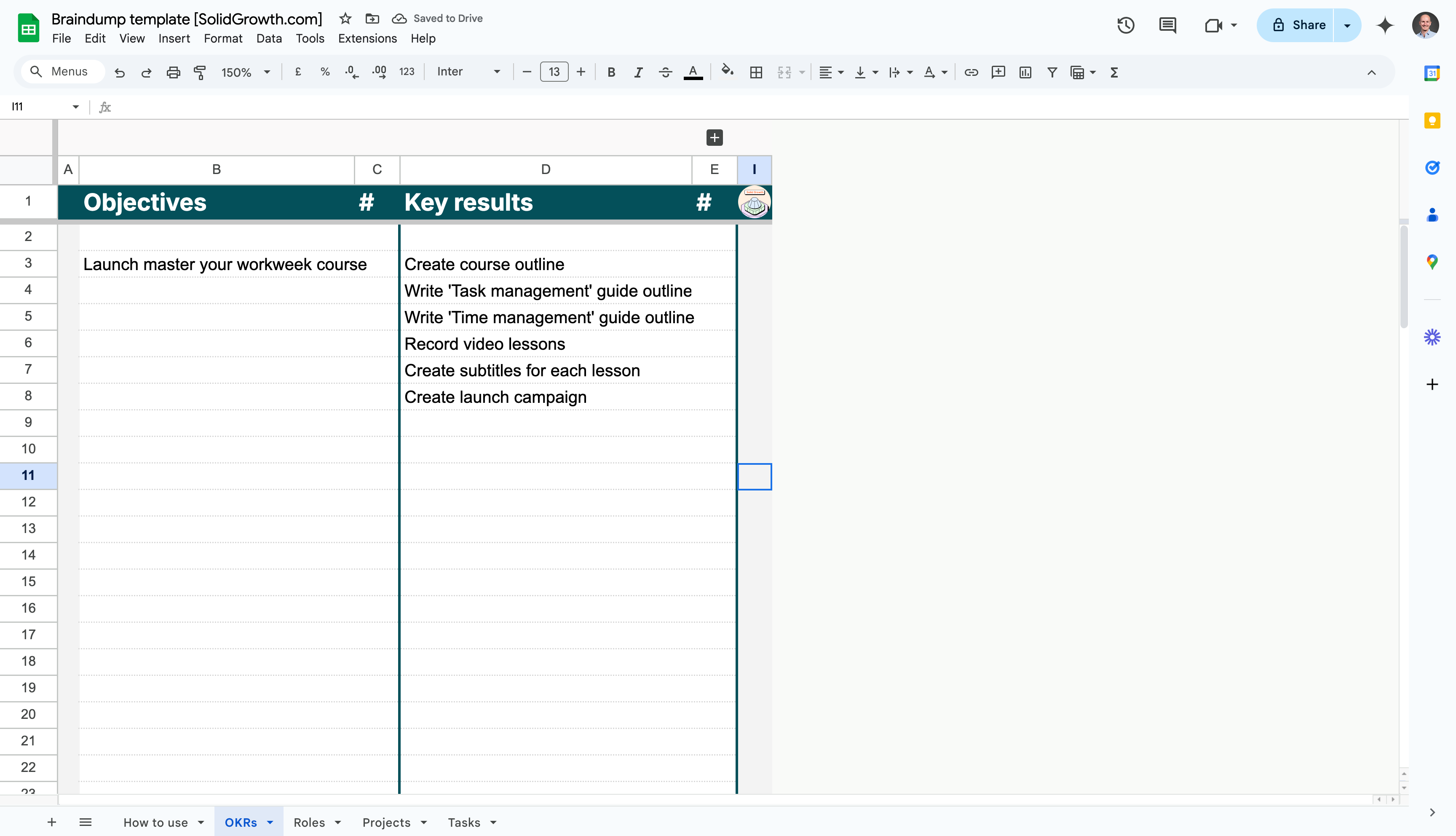
Step 1: Write down your OKRs
Start at the highest level by writing down your objectives and their corresponding key results. This ensures your brain dump is aligned with your top priorities.
Action steps
- Write your objectives in column B. Each objective represents a high-level goal.
- Add key results for each objective in column D. These should be specific and measurable.
- If you already have a priority order for your objectives, note it here.
Prompts
- What are the top goals you’re working towards this quarter or year?
- What measurable outcomes indicate progress towards these goals?
- Has your manager assigned you any specific objectives or results to focus on?
Step 2: Link your projects to key results
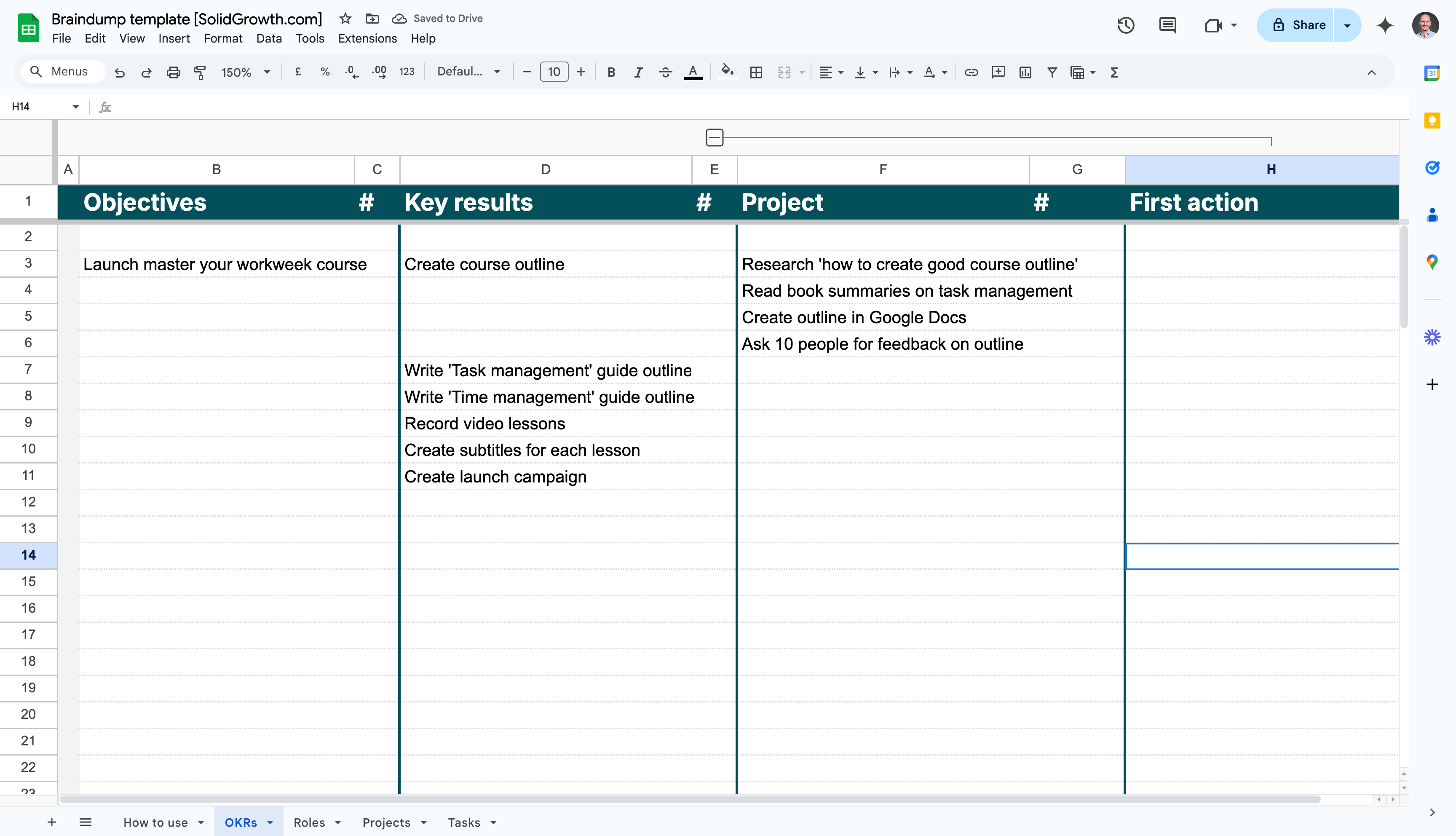
Now, map out the projects that will help you achieve your key results. These are the bigger initiatives or deliverables required to meet your goals.
Action steps
- Click on the + icon in the template to open column H, list all the projects linked to each key result.
- Keep it simple focus on projects that are essential for progress.
- Don’t worry about standalone tasks yet; we’ll capture those separately.
Prompts
- What projects are directly tied to your key results?
- Are there initiatives in progress or planned that contribute to your goals?
- What needs to happen for you to complete each key result?
Step 3: Determine the first action for each project
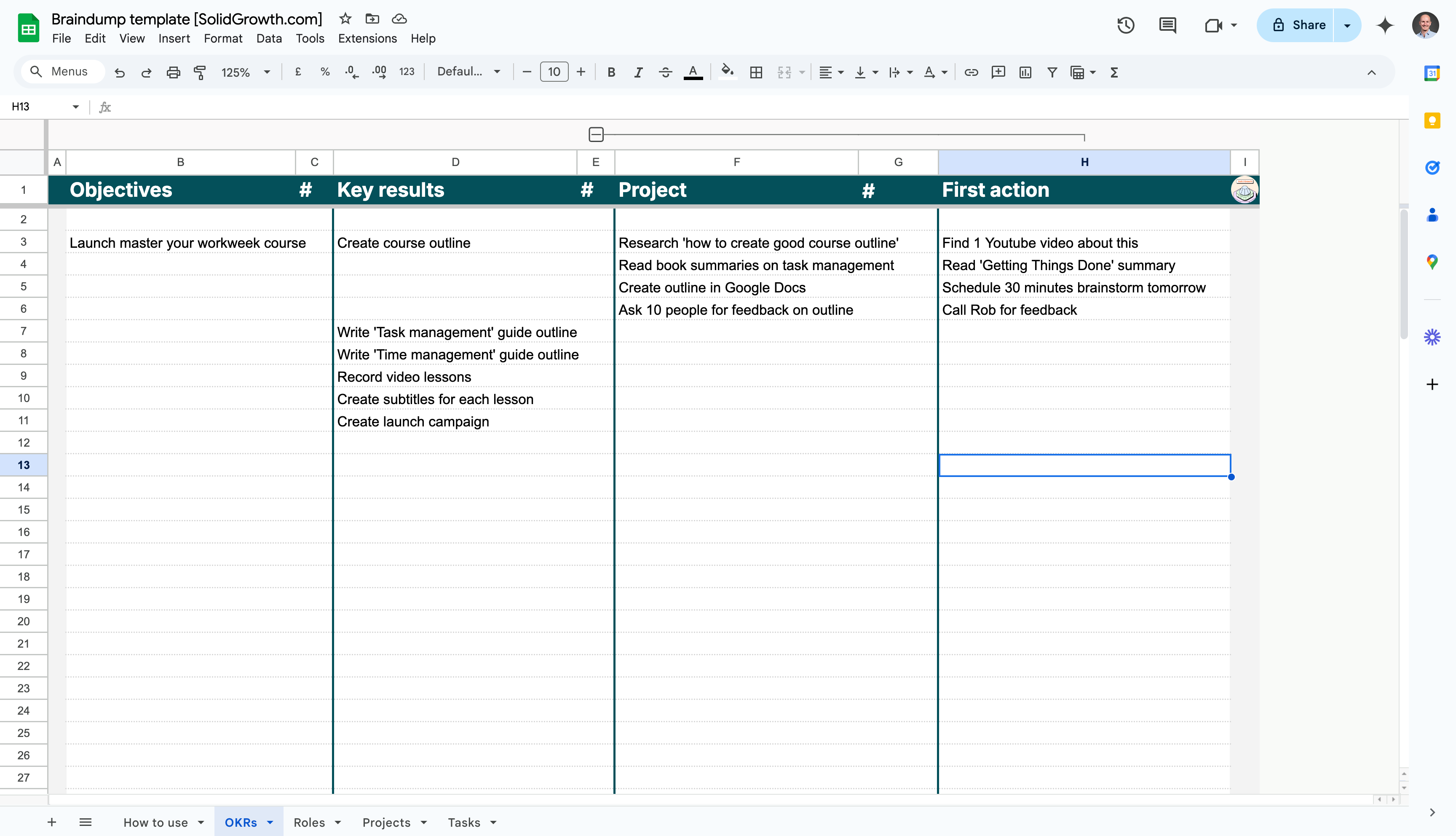
For every project, identify one clear, actionable step you can take to move it forward. This ensures that each project is actionable and not just an idea.
Action steps
- In column J, write the first step you can take to make progress on each project.
- Make this step small and manageable (e.g., “Draft an outline” or “Schedule a brainstorm”).
- If you’re stuck, write “Schedule a 30-min brainstorm to clarify next steps.”
Prompts
- What’s the simplest action you can take to move this project forward?
- Are there unanswered questions you need to address before starting?
- Can you break the project into smaller, more manageable tasks?
Step 4: List your roles and recurring responsibilities
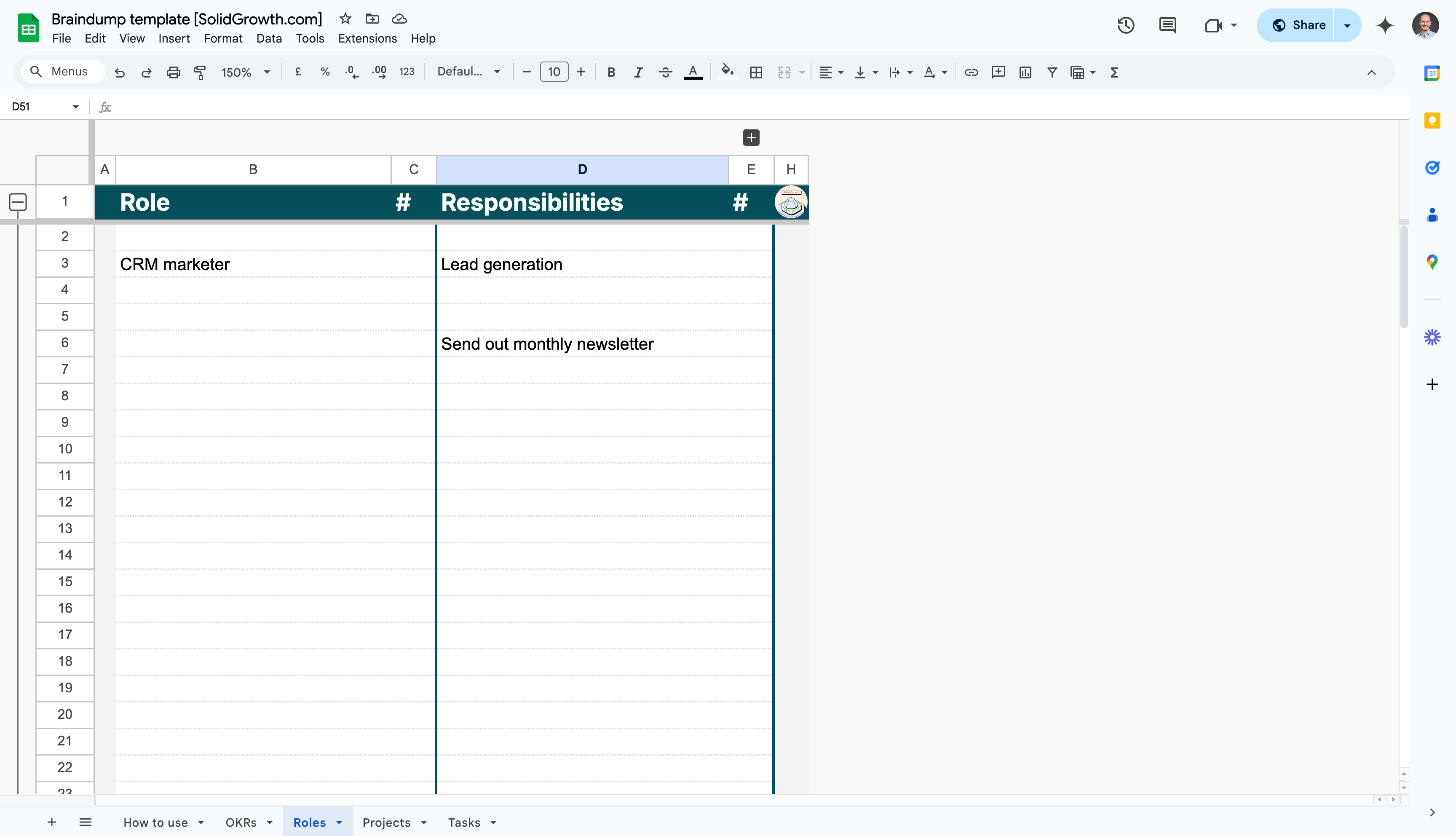
Identify the roles you fulfil in your professional and personal life, along with the recurring responsibilities tied to each role.
Action steps
- Write down all your roles in column B (e.g., “SEO Manager,” “Team Lead”).
- Add the key responsibilities for each role in column D (e.g., “Monthly reporting,” “1:1 meetings”).
- Include both work and personal roles.
Prompts
- What are the “hats” you wear at work or home?
- What responsibilities do you manage regularly in each role?
- Are there roles you’re handling informally that need to be acknowledged?
Step 5: Write down all your recurring tasks
Recurring tasks are the repeatable actions that support your roles and responsibilities. These might include weekly reports, monthly updates, or personal routines.
Action steps
- Write all recurring tasks in column F, tied to the relevant responsibilities.
- In column G, specify the frequency (e.g., daily, weekly, monthly).
- Capture both work-related and personal recurring tasks.
Prompts
- What tasks do you perform regularly in your roles?
- Are there routine actions (e.g., updating dashboards) you manage?
- What personal routines contribute to your overall effectiveness?
.png)
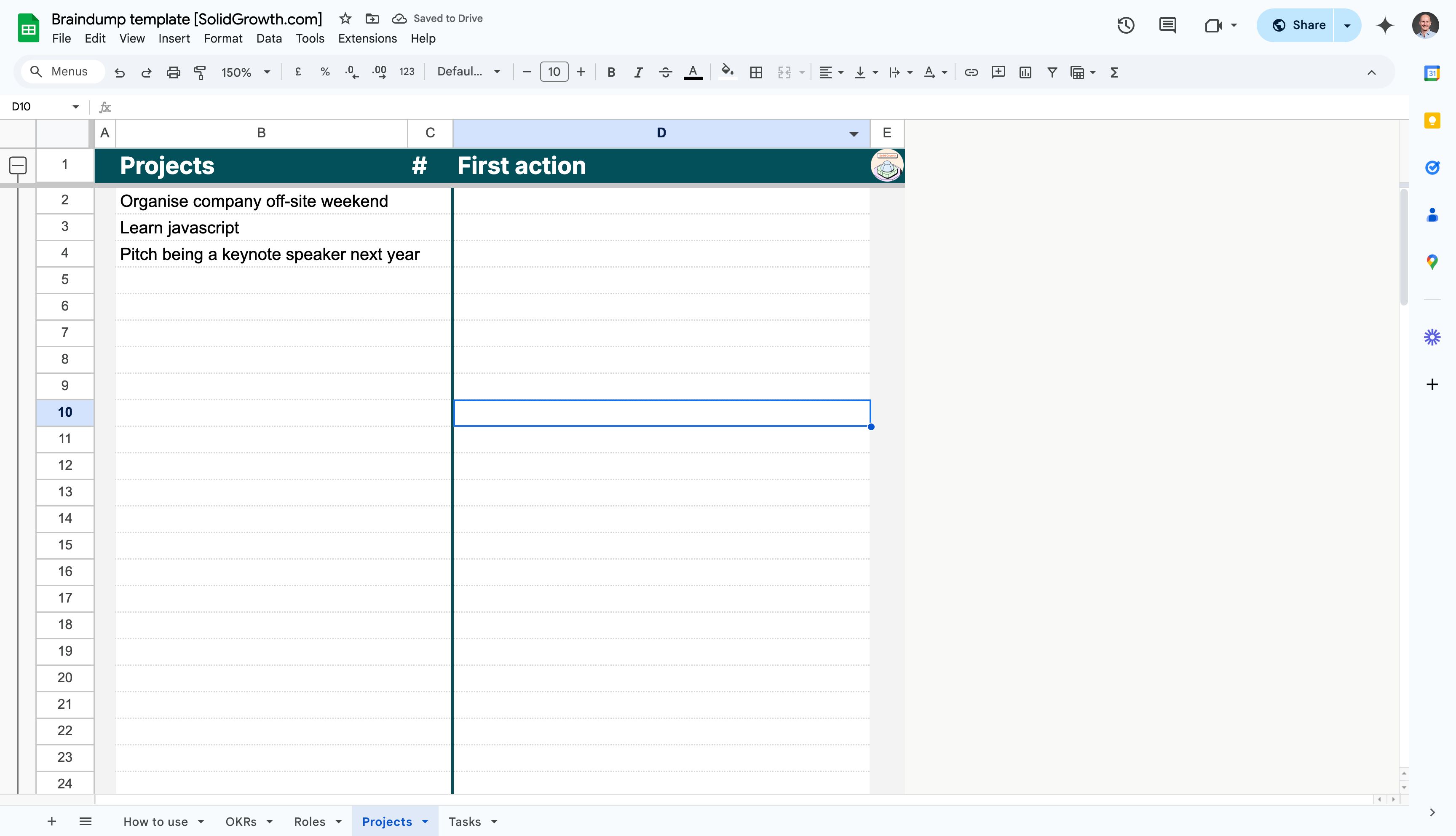
Step 6: List projects that don’t link to OKRs or roles
Capture any projects that don’t align directly with your OKRs or roles. These might reveal hidden priorities or unnecessary work.
Action steps
- Write down projects that don’t clearly link to an OKR or role in the Projects sheet.
- Add the first (smallest) action you can take to move this project forward.
Prompts
- Are there active projects that don’t tie to a goal or role?
- Are there low-impact initiatives taking up your time?
- Do any of these projects need clarification or approval?
Step 7: Create a list of standalone tasks
Standalone tasks are one-off actions that don’t belong to a larger project but still need to get done.
Action steps
- List all standalone tasks in the Tasks sheet.
- Categorise tasks as quick wins, personal, or other if helpful.
- Mark any tasks that can be moved to the backlog for future consideration.
Prompts
- What small tasks or errands have been nagging you?
- Are there minor actions that could be completed in under 2 minutes?
- What personal to-dos have you been procrastinating on?
.png)
Step 8: Add future ideas to Tasks
Finally, capture all your long-term ideas, someday/maybe projects, or creative thoughts in the tasks list.
Action steps
- Use the Tasks sheet to list all future ideas and non-urgent projects.
- Add the checkmark to all 'backlog' tasks. We'll add them to a task management tools later on.
Prompts
- What projects or ideas would you like to explore someday?
- Are there creative initiatives or personal goals worth capturing?
- Do you have low-priority tasks that could wait for another time?
Next step after the brain dump
Congratulations! You’ve created a comprehensive overview of your workload, broken into OKRs, roles, projects, tasks, and a backlog.
Studies show that writing things down has a powerful effect on mental clarity. In the 1960s, psychotherapist Ira Progoff introduced the intensive journaling method as a way to explore thoughts, uncover patterns, and gain personal insight. Later, in the 1980s, psychologist James Pennebaker discovered that expressive writing - which he called writing therapy - could reduce stress and improve mental and physical health. The act of putting thoughts on paper isn’t just therapeutic it’s transformative.
Then came David Allen in the early 2000s with his book Getting Things Done. He introduced the “Mind Sweep” as the first step in his productivity system. The idea is simple: your brain isn’t built to store endless lists of tasks, worries, and ideas. It’s built to process information. When you externalise what’s in your head, you free up mental space to think clearly and take action. This system made the concept mainstream, especially for professionals juggling overwhelming workloads.
But we’re in a digital age now. Tiago Forte took things further with his Building a Second Brain framework. He focuses on using digital tools to create an external system for storing and organising thoughts, tasks, and ideas. The principle, though, remains the same: get everything out of your head. Once it’s out, you can see the big picture, prioritise, and act with intention.
At its core, the brain dump is the first step. It’s about clearing the mental clutter so you can organise and make sense of it all. Whether you prefer paper or digital tools, the goal is always the same: free your mind, gain clarity, and create space for what truly matters.
Why it matters
Braindumps matter because human working memory is severely limited we can typically hold only 4-7 items at once yet we try to mentally juggle dozens of commitments, ideas, and concerns simultaneously. This constant cognitive load drains mental energy, impairs decision-making, and creates persistent low-level anxiety as your brain repeatedly reminds you of unfinished business. By conducting regular braindumps (weekly or when feeling overwhelmed), you free up cognitive bandwidth for deep, creative work. Research shows that unfinished tasks create intrusive thoughts (the Zeigarnik effect), but simply writing them down reduces this mental interference even before you complete them. For growth marketers managing campaigns across multiple channels whilst responding to stakeholder requests, braindumps prevent important tasks from slipping through the cracks. The technique is particularly valuable before strategic thinking sessions, as it clears mental clutter that would otherwise interrupt your focus. Regular practitioners report reduced stress, improved sleep, and enhanced ability to concentrate on high-value work.
A braindump is the act of getting everything out of your head and onto a page or screen, all at once. Tasks, half-formed ideas, nagging worries, the thing you keep meaning to email someone about. You stop trying to hold it all in working memory and just dump it somewhere you trust.
The reason this works is simple: your brain is built to think, not to store. Human working memory holds only a handful of things at a time, yet most of us try to juggle dozens of open loops at once. That constant background hum drains your focus and leaves you anxious without knowing quite why. Writing it all down quietens the noise, even before you've done a single task on the list. The psychologists call those nagging open loops the Zeigarnik effect; you'll just call it relief.
The practice is plain. Block 25 minutes, kill your notifications, and write without organising. Start high (your quarter's objectives), work down through projects and recurring responsibilities, and finish with a backlog of someday ideas. Sort it afterwards, never during, the whole point is to let it flow.
Where it lands matters as much as the dump itself. A few ways founders run it:
- Say you're doing a weekly braindump and you live in your task manager. Fire everything straight into Todoist as a flat inbox list, then triage into projects and due dates once the timer stops, the capture is frictionless and nothing escapes.
- Say you're building a second brain and want the dump to connect to everything else. Drop it into a Notion inbox page, then link items out to the project pages and docs they belong to, so a stray thought becomes a tracked piece of work.
- Say you've dumped a messy wall of text and can't face sorting it. Paste it into ChatGPT and ask it to group the items into projects, tasks, and someday-ideas, you get a clean structure back in seconds and keep the momentum.
The tool is secondary. The discipline is the same one David Allen called a Mind Sweep and Tiago Forte built into Building a Second Brain: get it out of your head so you can actually see it, prioritise it, and act with intention. Free the mind, find the clarity, make room for the work that matters.